Blank bucket list template PDF, US Letter
A blank one-page bucket list to fill in by hand: 20 lines in four categories (travel, experiences, growth and career, health and relationships), each with a box to tick and a column for when. Nothing to sign up for.
One page, 8.5 × 11 in (215.9 × 279.4 mm). Need the other size? Bucket list PDF, A4.
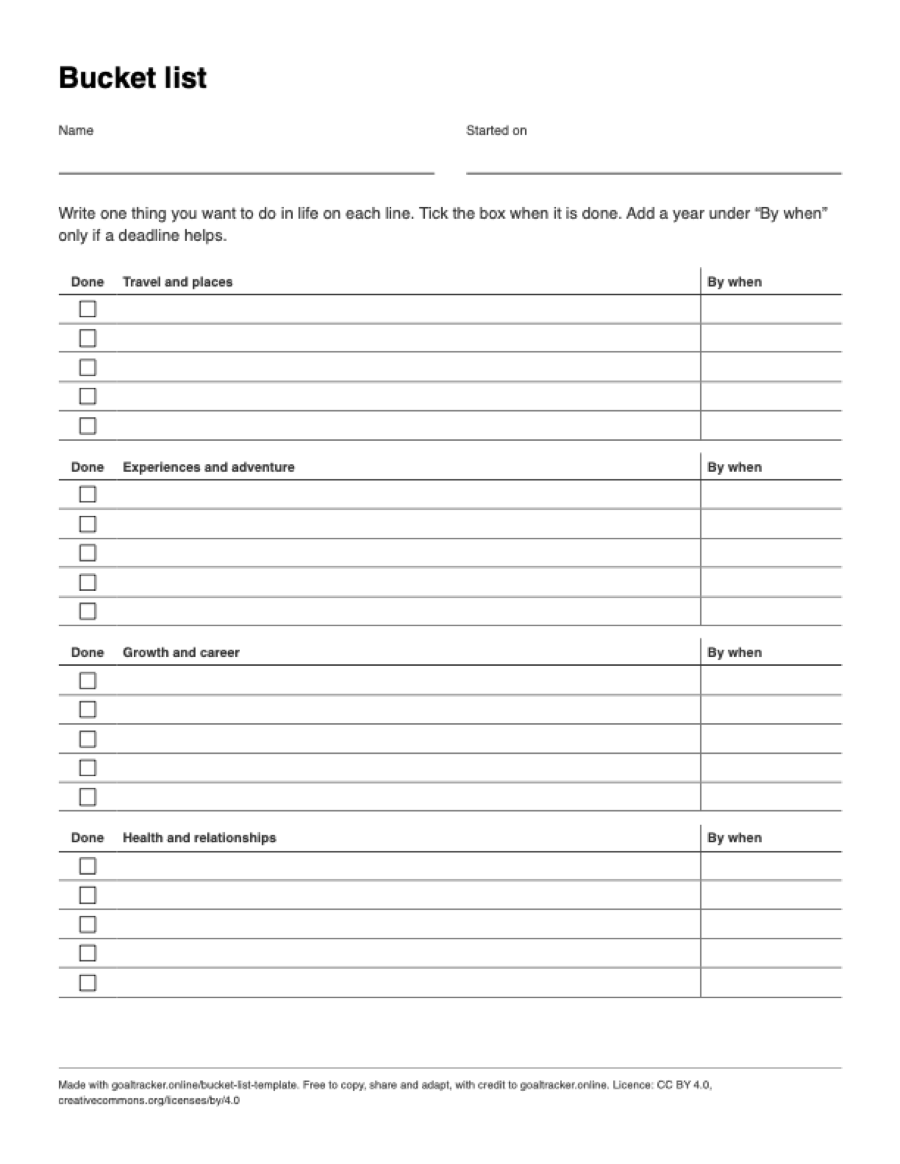
What is on the sheet
- Lines for your name and the date you started the list.
- One line of instructions.
- Four tables, one per category: “Travel and places”, “Experiences and adventure”, “Growth and career” and “Health and relationships”.
- Five rows in each table, 20 in all. Each row has a tick box under “Done”, a wide space for the item and a narrow “By when” column.
- A small credit line at the bottom. There is no logo or colour on the sheet.
On Letter the rows run the full 7.4 in width and are a little over a quarter of an inch tall: one short sentence per row in normal handwriting.
How to print it on US Letter paper
US Letter is 8.5 × 11 in (215.9 × 279.4 mm), the standard paper size in the United States and Canada, and common in Mexico and the Philippines. The file is one portrait page with 14 mm margins, which leaves a printable area 7.4 in wide.
- Open the PDF and choose Print.
- Set the paper size to Letter and the scale to 100% (some print dialogs call it “Actual size”). “Fit to page” also works, but shrinks the sheet slightly.
- Print in portrait. The sheet is black and white, so a mono printer or the grayscale setting is enough.
For a half-letter planner (5.5 × 8.5 in), print it at 64%. Half letter is a little taller in proportion than Letter, so the sheet fits the width and leaves a blank strip at the bottom.
If your printer holds A4 paper, use the A4 file instead. A Letter page printed on A4 paper is either scaled down or loses a strip at the side, because A4 is 6 mm narrower. Get the A4 version.
How to fill it in
- Write your name and today’s date at the top, so you can look back later at when each idea first went on the list.
- Fill the categories in any order. Write each item as something you could do and tick off, like “see the northern lights in Norway”, not a feeling like “travel more”.
- Leave “By when” blank unless a year or an age actually helps. A bucket list with a date on every line reads like a to-do list.
- Five rows per category is a starting point, not a quota. If one category stays empty, that is useful to know too.
- When you pick an item to work on this year, break it into steps in a goal tracker and tick the box here once it is done.
Paper or screen
The online bucket list template has the same four categories with idea starters, prints or downloads as Markdown or a Word file, and can download a file the tracker imports, with each item as a subgoal. Open the online bucket list template. It runs in your browser and nothing you type is sent anywhere.
To check steps off day by day and keep a streak, use the free goal tracker: no account, and your goals stay on your device.
Questions
Is there a Word version of this bucket list template?
Yes. The online bucket list template downloads a Word file (.docx) that opens in Microsoft Word, Google Docs, Pages and LibreOffice. Download it blank, or fill in the list on the page first.
What if I have more than 20 things?
Print a second copy, or use the online template, which takes up to 10 items per category and prints the whole list.
Can I type into the PDF?
No. The file is a flat page for printing and writing on, not a fillable form. To type instead, use the online bucket list template, or download its Word file.
Should I print the A4 or the US Letter version?
Use the file that matches the paper in your printer. A4 (210 × 297 mm) is the standard paper size in most countries outside North America; US Letter (8.5 × 11 in) is the standard paper size in the United States and Canada, and common in Mexico and the Philippines. Both files have the same layout, and either prints at 100% without anything cut off on its own paper.
Is the bucket list template PDF free to print and share?
Yes. There is no account, email or payment. You may print as many copies as you like and share or adapt the sheet, in a classroom or workshop too, under the CC BY 4.0 licence, as long as you credit goaltracker.online. The credit line is already printed on the sheet.
Reuse
Free to copy, share and adapt, including in a classroom, a workshop or a newsletter, as long as you credit goaltracker.online. The licence is CC BY 4.0, and the credit line is already printed at the foot of the sheet.
More blank PDFs on US Letter
- Mandala chart PDF, US Letter
- 30-day habit tracker PDF, US Letter
- Goal tracker PDF, US Letter
- Eisenhower matrix PDF, US Letter
- Weekly review PDF, US Letter
- Daily planner PDF, US Letter
Related: 100 bucket list ideas by category, the printable goal tracker for one item at a time, all free tools and templates.